Global P2P Package Delivery

Ship anything,
anywhere — via
real travelers.

Connect with verified travelers flying your route. No couriers. No tracking numbers. Just people helping people — and a WhatsApp message away.

KYC-verified travelers only
Personal-use items only
No in-app payments
AM

Amara Mbeki

KYC ✓

★★★★★ 4.9 · 23 reviews

8 KG
Istanbul (IST) → Douala (DLA)

Travel date

May 22, 2026

Contact
Typical range on this route $8–$15 /kg

Package Accepted

Sara N. · 2.5 KG confirmed

All on WhatsApp

No in-app messages

How It Works

Simple. Safe. Social.

No couriers, no apps to integrate. Kilodey is a matchmaker — the deal happens between real people.

Step 01

Search your route

Enter origin → destination and date range. Browse verified travelers with available KG capacity on your exact route.

Step 02

Check their profile

Each traveler shows their KYC verification badge, star ratings, and review history so you can choose with confidence.

Step 03

Connect on WhatsApp

One tap opens a pre-filled WhatsApp message to the traveler. Negotiate price and arrange the handoff — all outside the app.

Step 04

Leave a review

After the trip, both parties can leave reviews to build a trusted community of reliable senders and travelers.

Active Routes

Popular routes right now

Travelers are active on hundreds of routes connecting Turkey, Africa, Europe, and beyond.

Istanbul → Douala

Turkey → Cameroon

12

travelers

Istanbul → Lagos

Turkey → Nigeria

9

travelers

Paris → Dakar

France → Senegal

7

travelers

Istanbul → Abidjan

Turkey → Côte d'Ivoire

5

travelers

Dubai → Nairobi

UAE → Kenya

8

travelers

London → Accra

UK → Ghana

6

travelers

Use Kilodey like a native app

No App Store needed. Kilodey is a Progressive Web App — install it in seconds on any iPhone or Android.

1Step 1 of 6

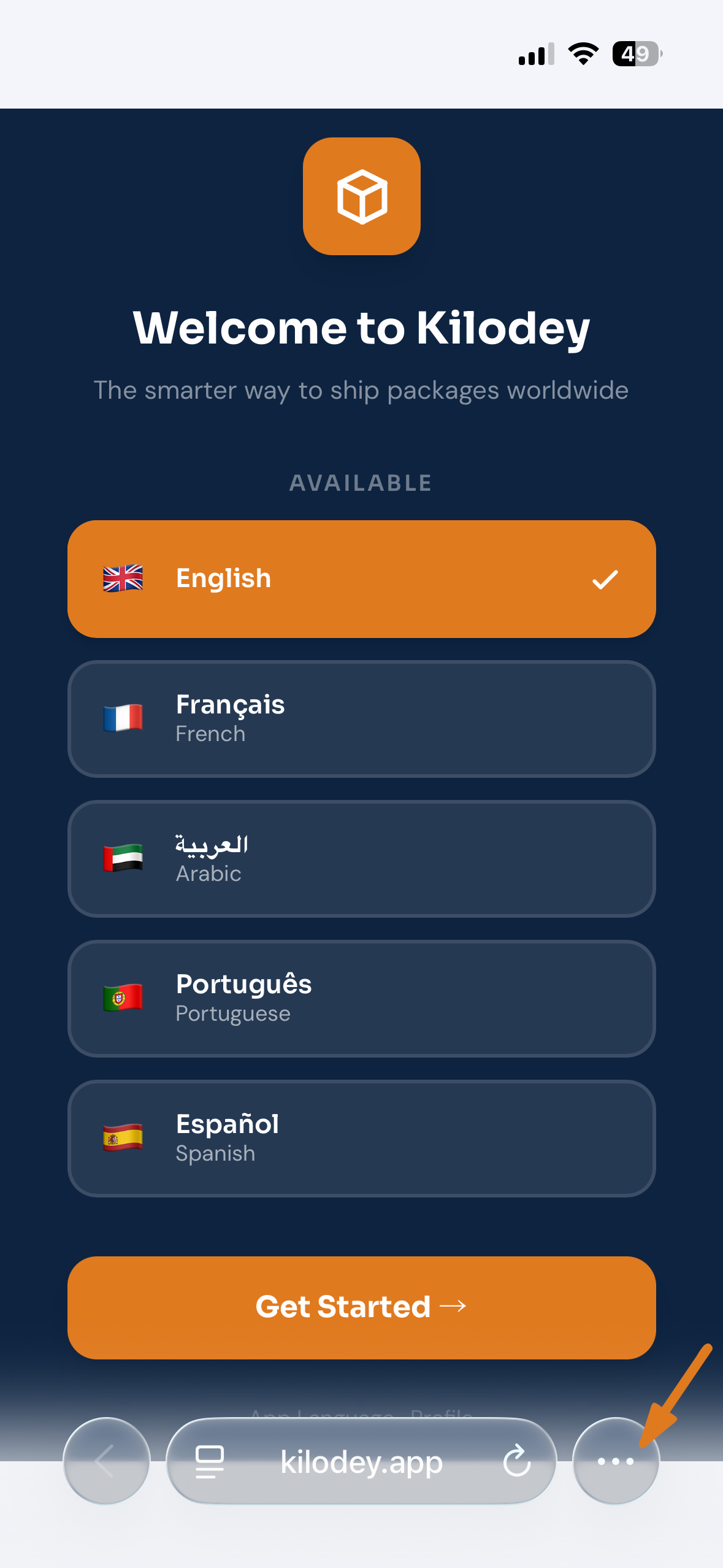
Open kilodey.app
in your browser

On your iPhone, go to kilodey.app in your browser. Once the page loads, look for the menu at the bottom of the browser bar — on Safari it's the Share icon, on Chrome it's the three dots (···).

2Step 2 of 6

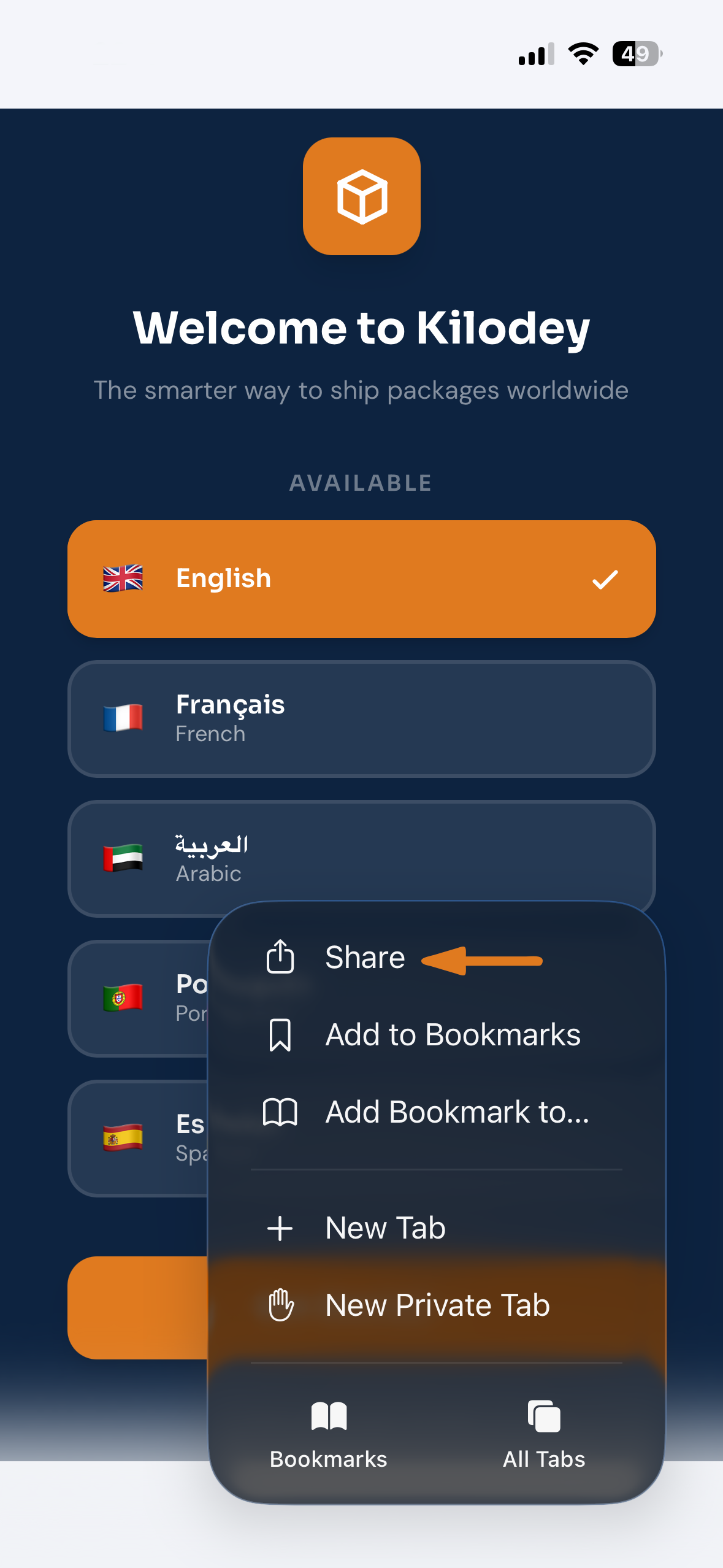
Tap the
Share icon

Tap the Share button — the square with the upward arrow. On Safari it's in the bottom toolbar; on Chrome it's inside the three-dot menu at the top.

3Step 3 of 6

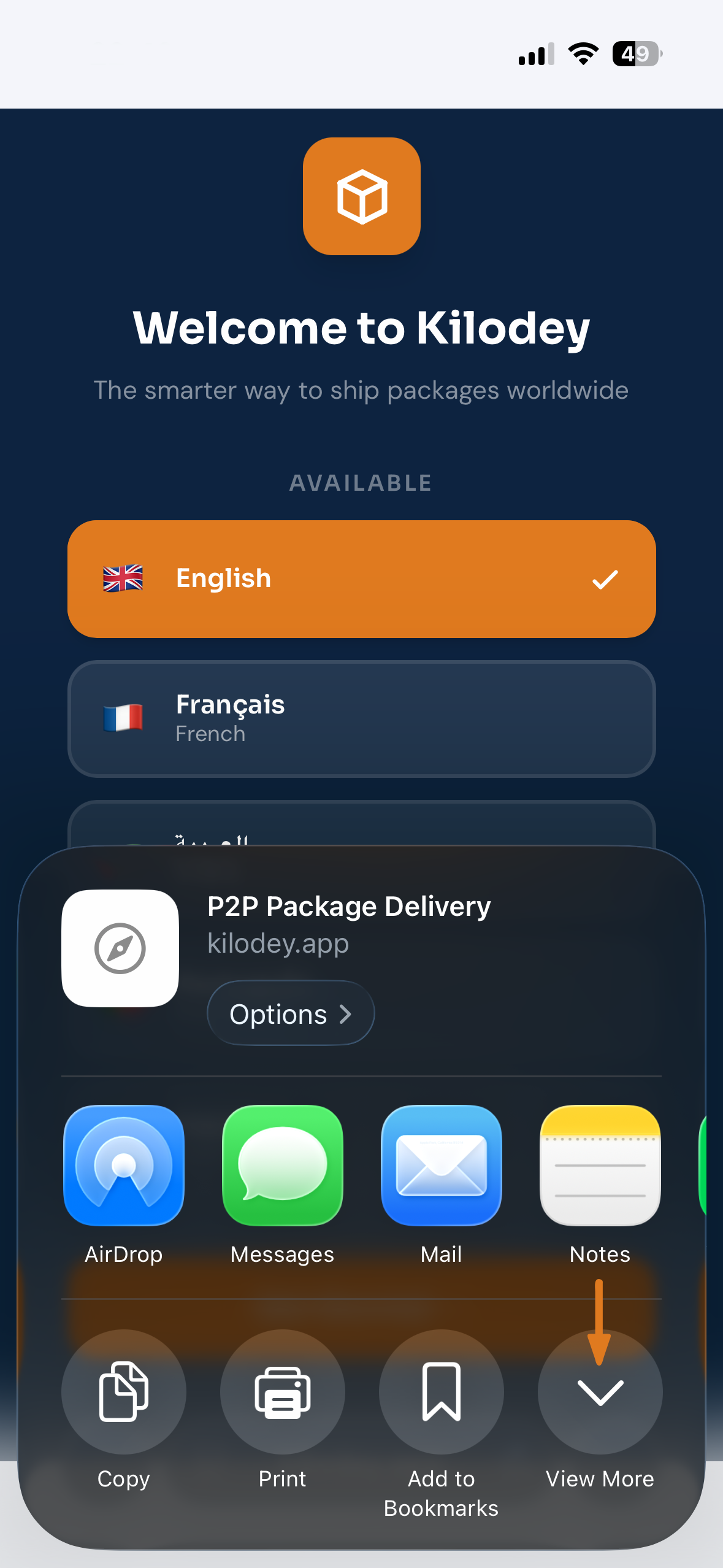
Tap
"View More"

A share sheet appears showing quick actions and app shortcuts. Scroll down and tap "View More" to expand the full list of available actions.

4Step 4 of 6

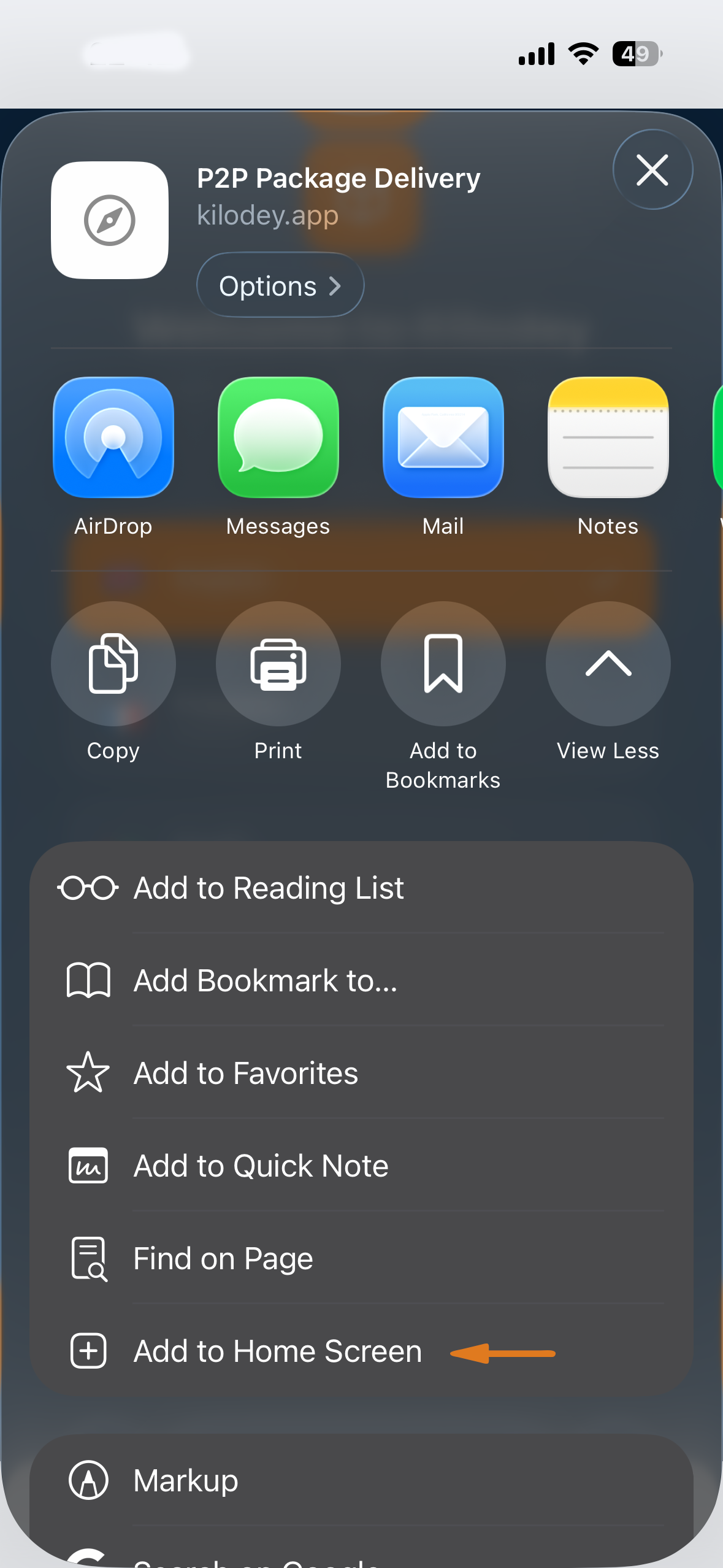
Select "Add to
Home Screen"

In the expanded list, tap "Add to Home Screen". The orange arrow in the screenshot points right to it. Scroll down in the list if you can't see it immediately.

5Step 5 of 6

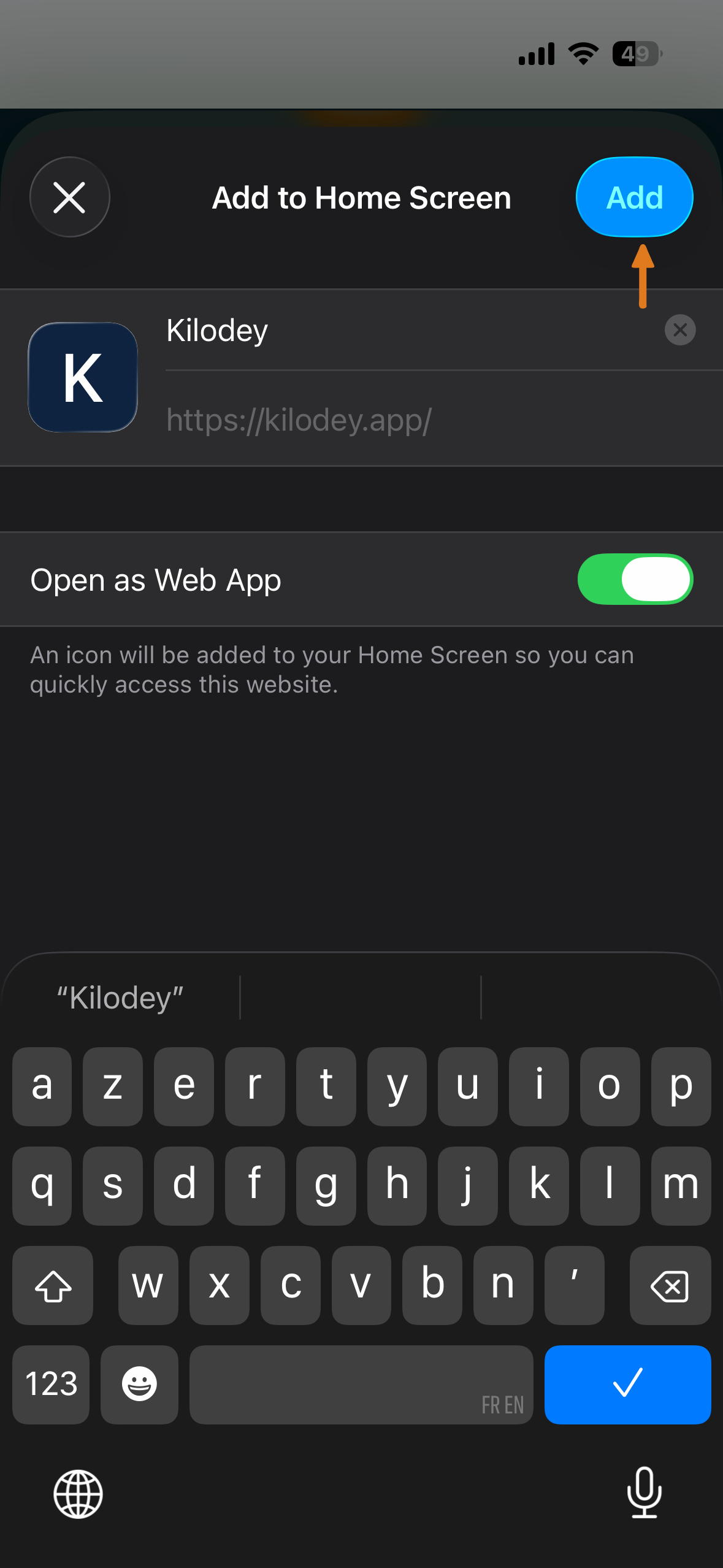
Tap "Add"

A confirmation screen shows the Kilodey icon, name, and URL. Make sure "Open as Web App" is toggled ON, then tap the blue "Add" button in the top-right corner.

Keep "Open as Web App" ON for the full-screen experience without a browser bar
You're all set!

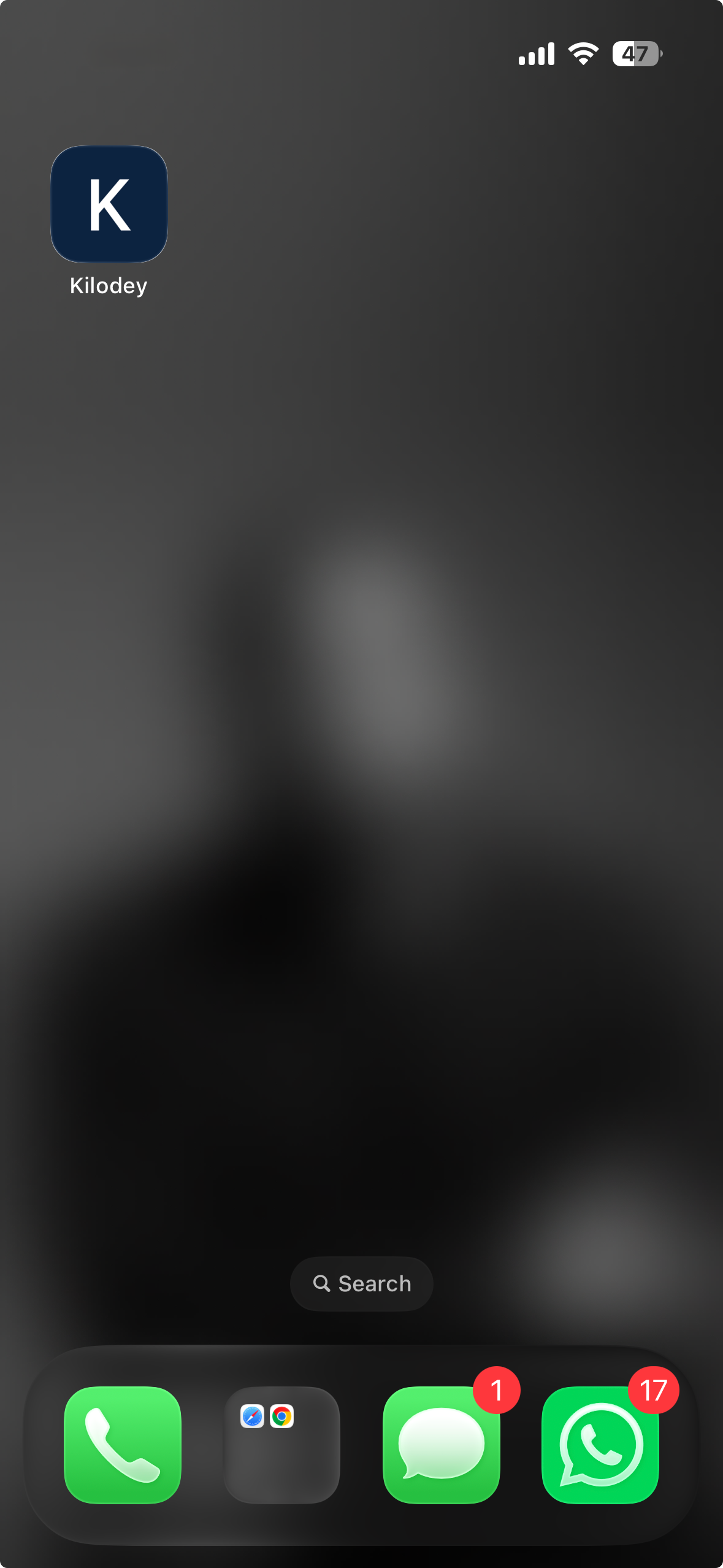
Kilodey is on
your home screen!

The Kilodey icon now lives on your home screen. Tap it to launch full-screen — no browser bar, no address bar. It looks and feels just like a native app.
Done — sign up takes under 2 minutes
Open Kilodey
Step 1 Step 2 Step 3 Step 4 Step 5 Installed
App installed!
Step 1
1Step 1 of 6

Open kilodey.app

Go to kilodey.app in your iPhone browser. Tap the menu button at the bottom of the browser bar — the Share icon on Safari or the three dots (···) on Chrome.

Step 2
2Step 2 of 6

Tap Share

Tap the Share button — the square with the upward arrow highlighted with the orange indicator.

Step 3
3Step 3 of 6

Tap "View More"

The share sheet opens. Scroll down and tap "View More" to see all available actions.

Step 4
4Step 4 of 6

Select "Add to Home Screen"

In the expanded list, tap "Add to Home Screen" — pointed out by the orange arrow.

Step 5
5Step 5 of 6

Tap "Add"

The confirmation screen appears. Keep "Open as Web App" ON, then tap the blue "Add" button.

Done
Done!

Kilodey is on your home screen!

The Kilodey icon is now on your home screen. Tap it to launch full-screen — just like a native app.

Sign up takes under 2 minutes
Open Kilodey →

Step 01

Open in Chrome

Go to kilodey.app in Google Chrome on your Android phone.

Step 02

Tap ⋮ Menu

Tap the three-dot menu in the top-right corner of Chrome to open the options.

Step 03

Add to Home Screen

Tap "Add to Home Screen" or "Install app", then confirm by tapping Add.

Done!

You're all set!

Kilodey appears on your home screen. Tap it to launch full-screen.

Open Kilodey

Community

Trusted by senders & travelers

Real stories from the Kilodey community around the world.

★★★★★

"I've been flying Istanbul–Douala for years. Now I earn extra by helping families send packages home. The KYC process was smooth and the platform is dead simple."

AM

Amara Mbeki

Verified Traveler · Cameroon

★★★★★

"I bought shoes for my dad in Istanbul and found a traveler within hours. We met at the airport and he delivered them the next day. Incredible service."

SN

Sara Njoh

Sender · Nigeria

★★★★★

"The WhatsApp contact system is genius — no complicated in-app chat. I found a traveler, called him, and we sorted everything in 5 minutes. Package arrived safe."

EK

Emmanuel Kouassi

Sender · Côte d'Ivoire

Ready to send something?

Search travelers on your route — it takes 30 seconds.

Find a Traveler Now Become a Traveler